PromptPay QR code generator
Make a Thai QR code for PromptPay payments: enter the mobile number or 13-digit ID linked to your PromptPay, add an amount if you want one, and save the QR to send to a client. Made on your device, no signup.
1How to make a PromptPay QR
- Choose what your PromptPay is linked to: a mobile number, or a national ID / tax ID.
- Enter that number.
- Enter an amount if you want the QR to carry it for the payer.
- Press "Save the QR image", then send it in a chat or place it in a document. On a phone you can also press and hold the image to save it.
Before you use it, scan the QR once with your own banking app and check the account name and the amount. This tool checks only the format of the number. It cannot tell whether the number is registered for PromptPay or who it belongs to.
2Works with any bank
A PromptPay QR points to the mobile number or 13-digit ID you registered, not to a bank. You can make it here whichever Thai bank your PromptPay is linked to.
Many banking apps can make a receive-money QR too. This page is for when you want a QR with an amount as an image without opening the banking app, or from a computer.
3With an amount or without
- With an amount: the payer scans and the amount is already filled in. This suits an invoice, because it avoids transfers of the wrong amount.
- Without an amount: the payer types the amount. The same QR can be used again, which suits a shop counter or a profile.
A QR with an amount is for that amount only. If the amount changes, make a new QR.
4Which amount to use when the client withholds tax
A company client that withholds tax transfers less than the invoice amount, so the QR should carry the amount after withholding tax.
Example: on a ฿15,000 invoice the client withholds 3%, which is ฿450, so the QR amount is ฿14,550. Work out your own figure with the withholding tax calculator.
BaiPe works out the amount after tax and puts it in the QR on the invoice by itself.
5Mobile number or national ID
Use the number you registered for PromptPay with your bank. If you have not registered yet, you can do it in your banking app.
- A PromptPay QR contains the number that receives the money, and anyone who has the QR can read it. If you do not want your national ID number on documents that get passed around, use a mobile number.
- The image saved from this page shows the number partly hidden, such as 081-xxx-4455. The full number is still inside the QR.
- A company whose PromptPay is linked to its 13-digit tax ID chooses "National ID / tax ID".
6Is it safe
- The QR is made in your browser. The number and the amount are not sent to our server and are not stored. We record only that the tool was used, with no number and no amount.
- A PromptPay QR only receives money. Someone who scans it can pay you, and cannot take money from your account with it.
- BaiPe is not a bank or a payment provider. The money goes from the payer’s account to yours through the banks. We do not see it or hold it.
7Putting the QR on an invoice
You can send the QR as a separate image, but the client then has to match it to the invoice. An invoice with the QR on the same page is easier to pay. Not sure which document to send? Read invoice vs receipt vs tax invoice.
BaiPe makes quotations, invoices and receipts on your phone, adds a PromptPay QR for the amount to the document, and works out withholding tax.
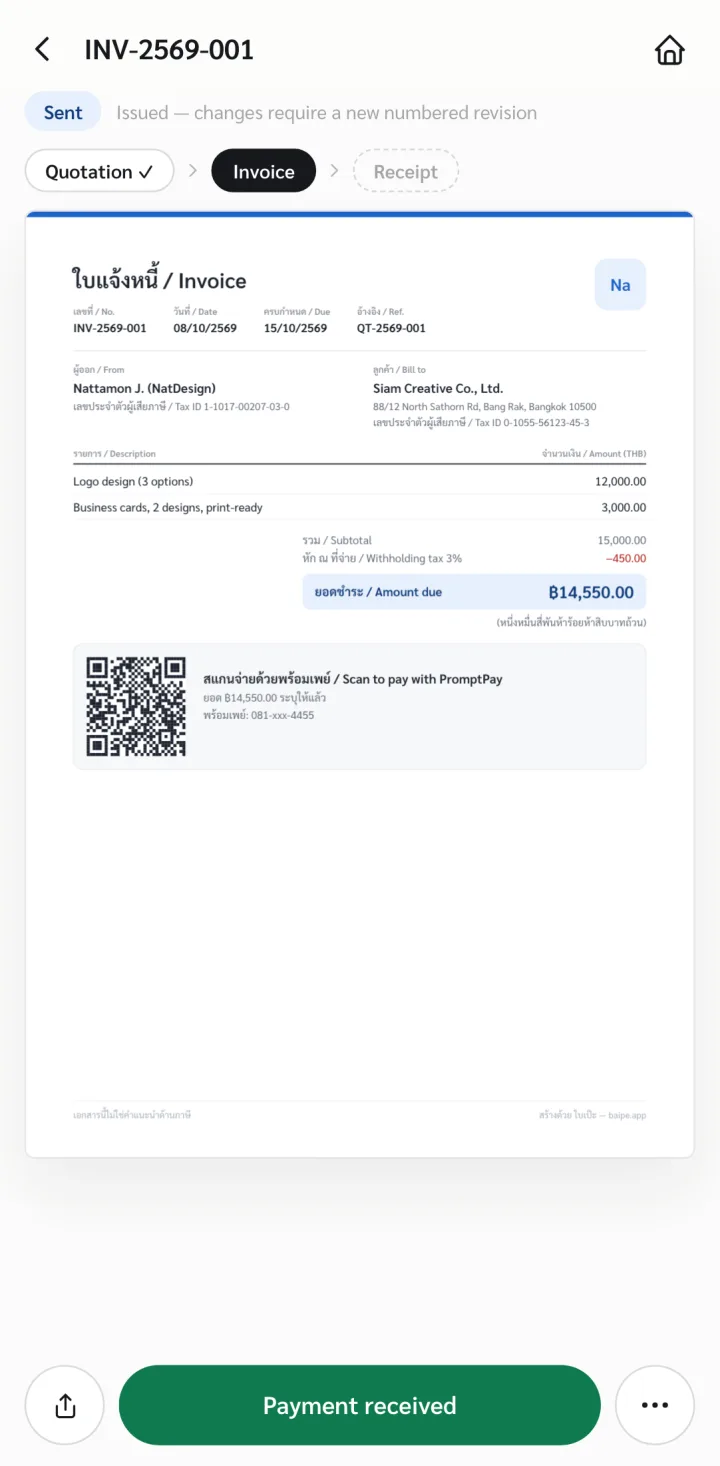
Your first 3 documents are free, with no signup. Start at app.baipe.app or read how to make an invoice on your phone.
8Common questions
What is a PromptPay QR?
A QR code in the Thai QR Payment format that holds the mobile number or 13-digit ID linked to PromptPay, and an amount if you add one. The payer scans it with a banking app and the money goes to the account linked to that number.
Is this PromptPay QR generator free?
Yes. There is no signup and no limit on how many you make.
Does a PromptPay QR expire?
A QR made on this page has no expiry date in it. It works for as long as the number stays linked to PromptPay.
Which banking apps can scan it?
The QR uses the Thai QR Payment format, so a Thai banking app that can scan to pay by PromptPay can read it. Scan it with your own app before you send it to a client.
Can the payer change the amount in the QR?
When the QR carries an amount, banking apps generally show that amount without the payer typing it. To let the payer type the amount, leave the amount field empty.
Do I need to register for PromptPay first?
Yes. The number must already be registered for PromptPay with a bank. Otherwise the payer scans the QR and the transfer does not go through.
Can I make the QR from a bank account number?
No. This page makes a QR only from a mobile number or a 13-digit ID linked to PromptPay.