Quotation example for freelancers in Thailand
A filled-in example quotation for a ฿15,000 design job, with what each part is for, the terms worth adding, and how to make one like it on your phone.
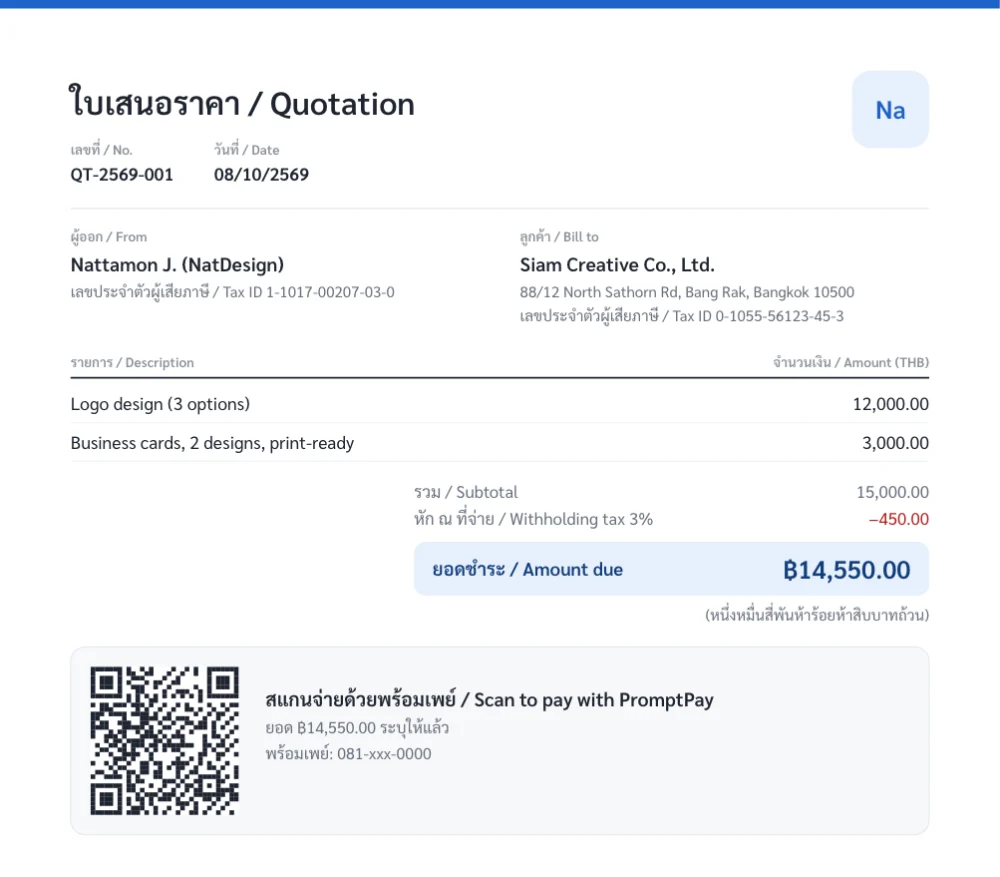
What is on it
- The document number and date
- The issuer’s name and taxpayer ID
- The client’s name, address and taxpayer ID
- Each item of work and its price
- Subtotal, 3% withholding tax and amount due
- A PromptPay QR for the amount due
A few minutes on your phone, no signup. You get a PDF to send in a chat.
1What a quotation is
A quotation (ใบเสนอราคา) is what you send a client before the work starts. It says what you will do, for how much, and on what terms, so the client can agree first.
A quotation does not ask for payment yet. Once the client accepts and the work is delivered, you send an invoice. For how the documents differ, see invoice vs receipt vs tax invoice.
2What a quotation should include
These are the parts a quotation usually has, in the order of the example above.
| Part | In the example | Why it is there |
|---|---|---|
| Heading | ใบเสนอราคา / Quotation | The client and its accounts team see at once what the document is |
| Number and date | QT-2569-001, dated 08/10/2569 | Something to refer to in conversation and on the invoice that follows |
| Issuer | Name and 13-digit taxpayer ID | A company client needs it to set you up as a vendor and to withhold tax |
| Client | Company name, address, taxpayer ID | Says who the quotation is for |
| Items | Logo design 12,000, business cards 3,000 | Shows what the price covers, item by item |
| Subtotal | 15,000.00 | The price of all the work |
| Withholding tax 3% | −450.00 | A company client sees in advance how much it will withhold |
| Amount due | ฿14,550.00, also written out in Thai | What the client actually transfers |
| How to pay | A PromptPay QR with the amount | The client can scan and pay once it agrees |
The year 2569 is the Buddhist-era year, which Thai documents commonly use. If the client is an individual there is generally no withholding tax, and the amount due equals the subtotal. Work out your own figure with the withholding tax calculator.
3Terms worth adding
The example shows the core parts only. On a real job, put these terms in the notes of the quotation so they are not argued about later.
- How long the price holds, such as 30 days from the date on the document.
- Payment terms, such as a 50% deposit before work starts and the rest on delivery.
- Timing, such as a first draft within 7 days of the deposit.
- Rounds of revisions, and the price of changes beyond them.
- What the price does not cover, such as printing, image licences or travel.
4A quotation from an individual
An individual or freelancer can issue a quotation. You do not need a company. What differs:
- Use your own name (with a trading name after it if you like) and your 13-digit taxpayer ID, which for a Thai national is the national ID number.
- If you are not VAT-registered the price carries no 7% VAT and the document has no VAT line. See which documents you can issue without VAT registration.
- A company client generally withholds 3% tax on service fees. Show it on the quotation so the client sees what it will actually transfer.
5After the client accepts
- Keep the acceptance, such as a confirming message in a chat or an email.
- On delivery, make the invoice from the same quotation, so the items and amounts match.
- When you are paid, issue a receipt.
- If the client withheld tax, chase the 50 Tawi.
6Making a quotation like this on your phone
The example was made with the BaiPe app. It runs in your phone’s browser, with nothing to install and no signup.
- Open app.baipe.app and enter your name, taxpayer ID and PromptPay number.
- Add a client, then start a new document.
- Enter the items and prices. Switch on "Withholding tax" if the client is a company.
- Check the preview, then issue the document and send the PDF in a chat or by email.
Your first 3 documents are free. After that a one-time ฿249 gives unlimited documents and your logo and signature. This page offers no Excel or Word file to download. For the steps with pictures, see how to make a quotation, invoice and receipt on your phone.
7Common questions
What should a quotation include?
Usually a number and date, the issuer’s name and taxpayer ID, the client’s name and address, each item with its price, the total, and terms such as how long the price holds and how to pay.
Can an individual issue a quotation in Thailand?
Yes. You do not need a company. Use your own name and your 13-digit taxpayer ID.
What is the difference between a quotation and an invoice?
A quotation goes out before the work, for the client to agree the price. An invoice goes out once the work is delivered, to ask for payment.
Does a quotation need VAT?
If you are not VAT-registered, you add no 7% VAT and the document has no VAT line.
Is there an Excel or Word quotation template to download?
No. This page is an example with an explanation. To get a document like it, make one in the BaiPe app and you get a PDF; the first 3 are free.
Can I make a quotation in English?
BaiPe documents have headings in both Thai and English, as in the example. You can type the names and items in any language.
8Sources
The rules on this page come from these Revenue Department documents (in Thai), last checked against the originals on 8 October 2026.
- Revenue Department Order Tor Por 4/2528: 3% withholding on service fees by payers that are juristic persons
- Revenue Code, Section 86/13: a person who is not VAT-registered may not issue a tax invoice